

Imagine having a personal assistant that never sleeps, doesn’t need a coffee break, and lives right inside your favorite messaging app.
This assistant doesn’t just sit in a browser tab waiting for you to type; it can manage your calendar, summarize your mountain of unread emails,
and even control your smart home while you’re out for a walk.
In the last few days, the AI world has been set ablaze by a new agent called OpenClaw Formally Clawdbot. It went viral almost overnight, with influencers claiming it’s the closest thing we’ve seen to “Artificial General Intelligence” (AGI).
But as the hype train reached top speed, so did the misinformation. People were even rushing to buy Mac Minis because of rumors that you needed specific hardware to run it.

Let’s cut through the noise. Whether you call it Clawdbot or its new, Anthropic-mandated name, Moltbot, this tool is a fascinating glimpse into the future of autonomous AI, if you know how to handle it.
What is Clawdbot (OpenClaw) Anyway?
It acts as a bridge between powerful AI brains (like Claude or GPT) and your actual digital life. Because it stays active, you can reach out to it via Telegram or WhatsApp at any time.
You aren’t just asking it questions; you’re giving it “skills” to perform tasks across platforms like Notion, Trello, Google Calendar, and even social media.
The Hardware Myth: Do You Really Need a Mac Mini?
- The Ultimate Inbox Filter: You can link it to your Gmail to summarize unread messages and even draft responses.
- The Master Scheduler: Instead of clicking through a calendar, you can just text the bot: “Book a meeting with Sarah next Tuesday at 2 PM.” It will check for conflicts and add the event automatically.
- Social Media Manager: It can research trending topics on X (formerly Twitter) and regularly post content on your behalf.
- Smart Home Executive: From a Telegram chat, you can tell it to turn off your lights or check the thermostat if you’ve integrated it with a Home Assistant.
- Personal Data Briefings: It can pull data from health trackers like Whoop or check traffic alerts to give you a morning briefing before you even get out of bed.
How the Magic Happens: The Set-Up
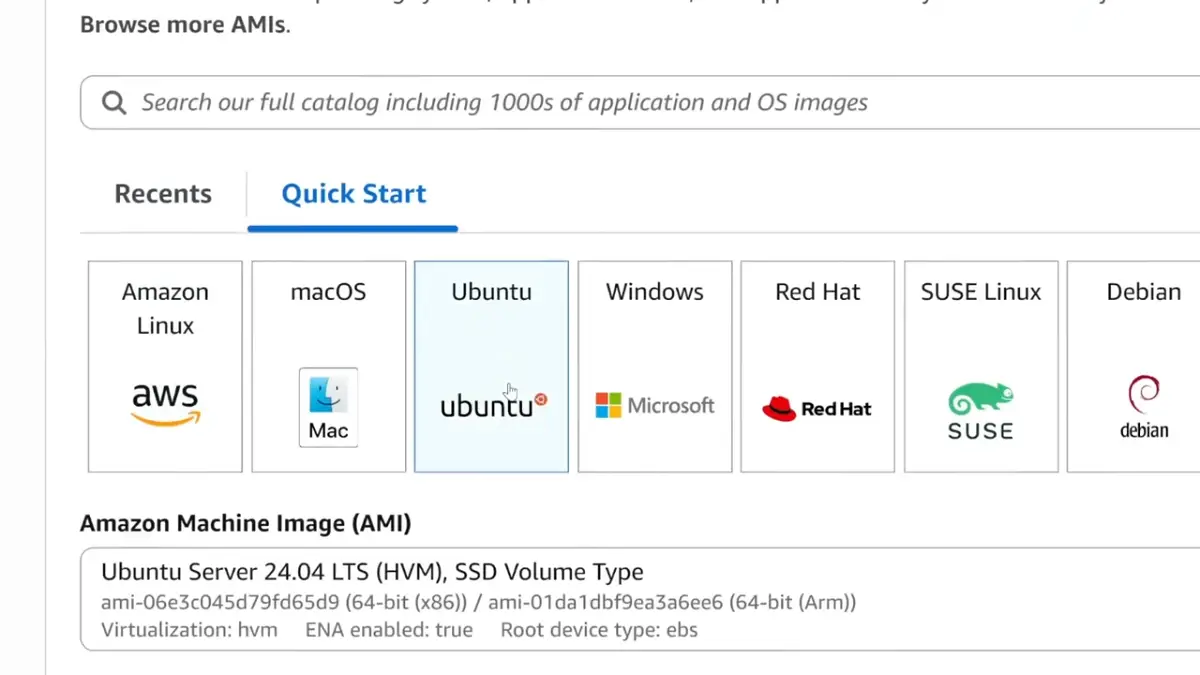
Despite what influencers say, this isn’t a “one-click” installation. It requires a bit of digital elbow grease.
To get it running on a cloud server, you’d typically set up a virtual machine (like Ubuntu on AWS) and use a simple “one-liner” command to download the software.
The most interesting part is choosing the “brain.” While the name “Clawdbot” implies it uses Anthropic’s Claude, it’s actually open-source, meaning you can link it to almost any AI provider.
The sources actually recommend using ZAI (GLM 4.7) instead of Anthropic. Why?
Because it’s significantly cheaper, roughly $8 for three months compared to $17+ per month for Anthropic, while offering similar performance levels.
Once the brain is connected, you link it to Telegram by creating a “token” through Telegram’s BotFather. Suddenly, you have a private chat window where your assistant lives.
Supercharging with Skills: The Claude Hub
Out of the box, Clawdbot is a bit like a blank slate. To make it useful, you visit the Claude Hub, a directory of community-created skills. You can find plugins for:
Web Searching: Using a Brave Search API, you can give your bot internet access so it can summarize today’s news.
• Self-Improvement: An agent skill that allows the bot to learn from its own mistakes and your preferences over time.
• Reminders: You can ask it to remind you to “touch grass” at 11:10 AM every day, and it will autonomously set up the task and message you.
The Elephant in the Room: Security and Privacy

Is It Revolutionary or Just Hype?
Conclusion
Clawdbot is a “power user” tool. If you’re willing to navigate a few terminal windows and manage your own API keys, it can become a transformative personal assistant.
It can save you hours of repetitive work and act as a 24/7 digital scout.
However, if you aren’t tech-savvy or if you’re worried about the security of your personal files,
you might want to wait for more polished, “sandboxed” versions of these agents to hit the market.
For now, the lobster bot is a brilliant, slightly chaotic look at where AI is headed: out of the browser and into our daily lives. Just remember to run a security audit before you give it the keys to your kingdom.
For more information stay updated with the latest trends from Skyosphere.